DataMagik Automate
Printers
Configure network printers, manage print jobs, and print labels and documents from scripts and automations.
Jul 21, 2026 Read More
Free and open source. Render Plex label formats on screen.
Render ZPL label code instantly on screen — design, debug and perfect Plex labels without a physical printer. Free and open source.
Free and open source
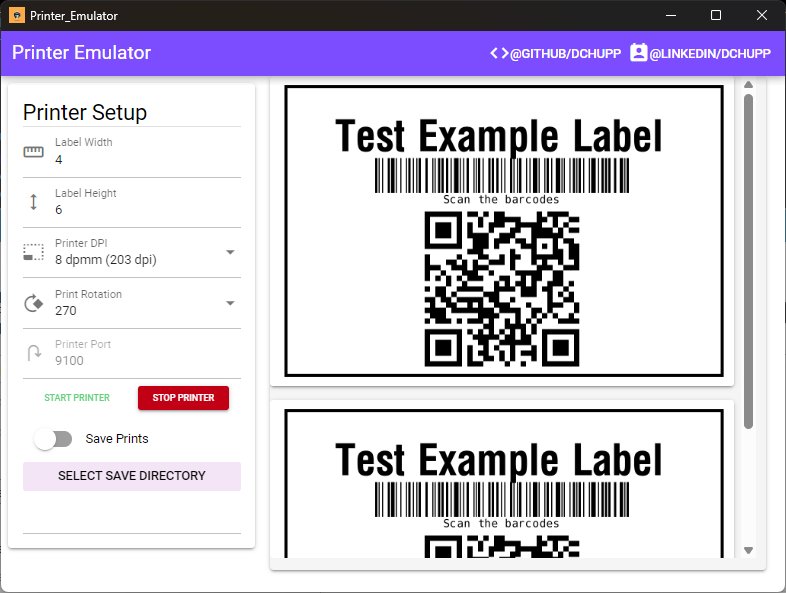
The ZPL Printer Emulator is a free, open-source desktop tool that renders ZPL on screen the moment you send it. Point a label format at it instead of a real printer and you can iterate on a design in seconds, without a queue, a roll of stock, or a walk to the label printer between attempts.
It was built for Plex Manufacturing Cloud label development, where the loop between changing a format and seeing the result is otherwise slow enough to discourage getting it exactly right.
Paste or stream ZPL and the label renders immediately. Change a field, send again, look — that is the whole loop.
Every iteration that would have consumed a physical label consumes nothing at all, which makes it reasonable to keep going until the layout is actually right.
No licence, no seat count, no expiry, and the source is on GitHub — fork it, read it, or change it to suit how your team works.
Take the installer if you just want to run it, or the repository if you would rather build it yourself or see how it works.
A 64-bit Windows installer — the Download Now button at the top of this page.
Releases, issues and the full source live in the printerEmulator repository.
The emulator renders ZPL — it does not author it. If you want to build the label templates as well, DataMagik Documents covers ZPL label creation and test printing alongside eight barcode symbologies, and generates the finished label from your live Plex data.
Configure network printers, manage print jobs, and print labels and documents from scripts and automations.
Monitor the print queue in real time and review the history of every print job.