OCR Providers
Updated Jul 21, 2026
OCROCR Providers
An OCR provider is the engine that turns a document image into text before an Extraction Profile pulls fields out of it. You can register a self-hosted engine (a RapidOCR / PaddleOCR sidecar) or a cloud document-AI service (AWS Textract, Google Document AI, Azure Document Intelligence). DataMagik tries your providers in order and falls back to AI vision — so extraction works even before you add one.
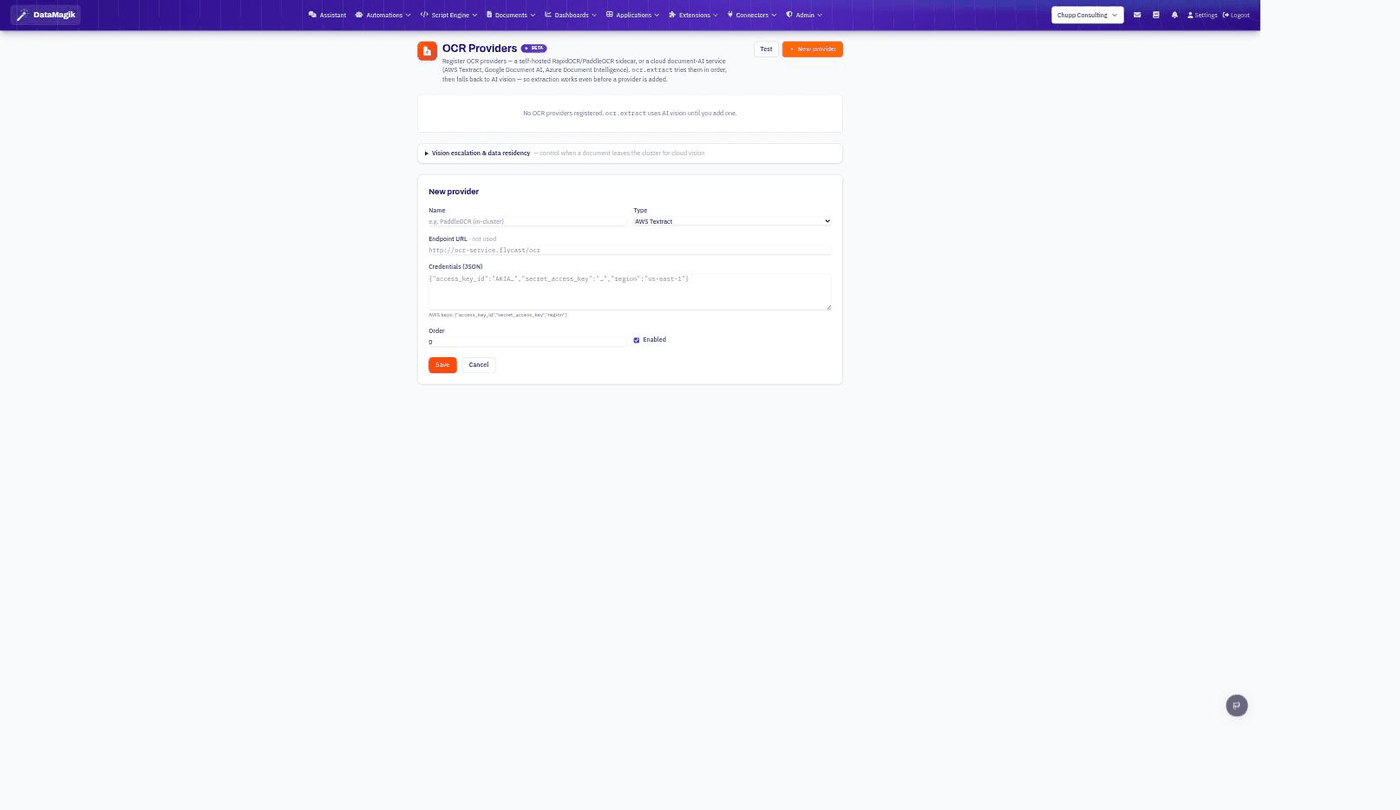
Adding a provider
- Click New provider and give it a Name.
- Pick a Type (self-hosted sidecar, AWS Textract, Google Document AI, or Azure Document Intelligence).
- For a self-hosted sidecar, set the Endpoint URL. For a cloud service, paste its
Credentials (JSON) — for example AWS keys as
{"access_key_id":"…","secret_access_key":"…","region":"us-east-1"}. - Set the Order (providers are tried lowest-first) and make sure Enabled is on. Save.
Use the Test button to confirm a provider responds before relying on it.
How extraction picks an engine
ocr.extract tries your enabled providers in order; if none succeed (or none are
registered) it falls back to AI vision. That means Extraction Profiles work out of
the box, and adding a dedicated provider is an optimization for cost, speed, or accuracy.
Vision escalation & data residency. The expandable
Vision escalation & data residency section controls when a document is allowed to leave
your cluster for cloud vision — useful if some documents must stay on-premise.
Related: Turn OCR text into structured fields with
Extraction Profiles.