Shipping
Shipping
Rate, buy and print FedEx and UPS labels for your Plex shippers through your own ShipEngine account, and write the tracking and freight back to Plex.
Shipping works on the shippers you already have in Plex. You load a shipper, check how it is packed, choose the carrier service, buy the label and print it. DataMagik then writes the tracking number, the freight and the overpacks back to the Plex shipper. Labels are bought through your company's own ShipEngine account, so the carrier bills you directly.
Parcel and international shipments are covered in these pages. Shipping can also book LTL freight with a bill of lading. LTL is not covered here.
License: Shipping needs the Shipping license feature on your company. Without it the Shipping menu is hidden, the pages are refused, and the phone and the Plex panel say Shipping is not licensed for this company. The phone app also needs the DataMagik Mobile license.
Three places to ship from
- The web workstation at
/shipping, under Shipping → Shipping workstation. See Shipping a shipper on the web. - Inside Plex, through the DataMagik browser extension. A Ship tab on a Plex shipper screen slides out the same workstation with that shipper loaded. See Shipping inside Plex.
- The phone app, DataMagik Mobile, under Shipping and Parcel + LTL. See Shipping from the phone app.
All three use the same shipping profiles, carrier accounts and label list. A label bought on the phone shows on the web, and the other way round.
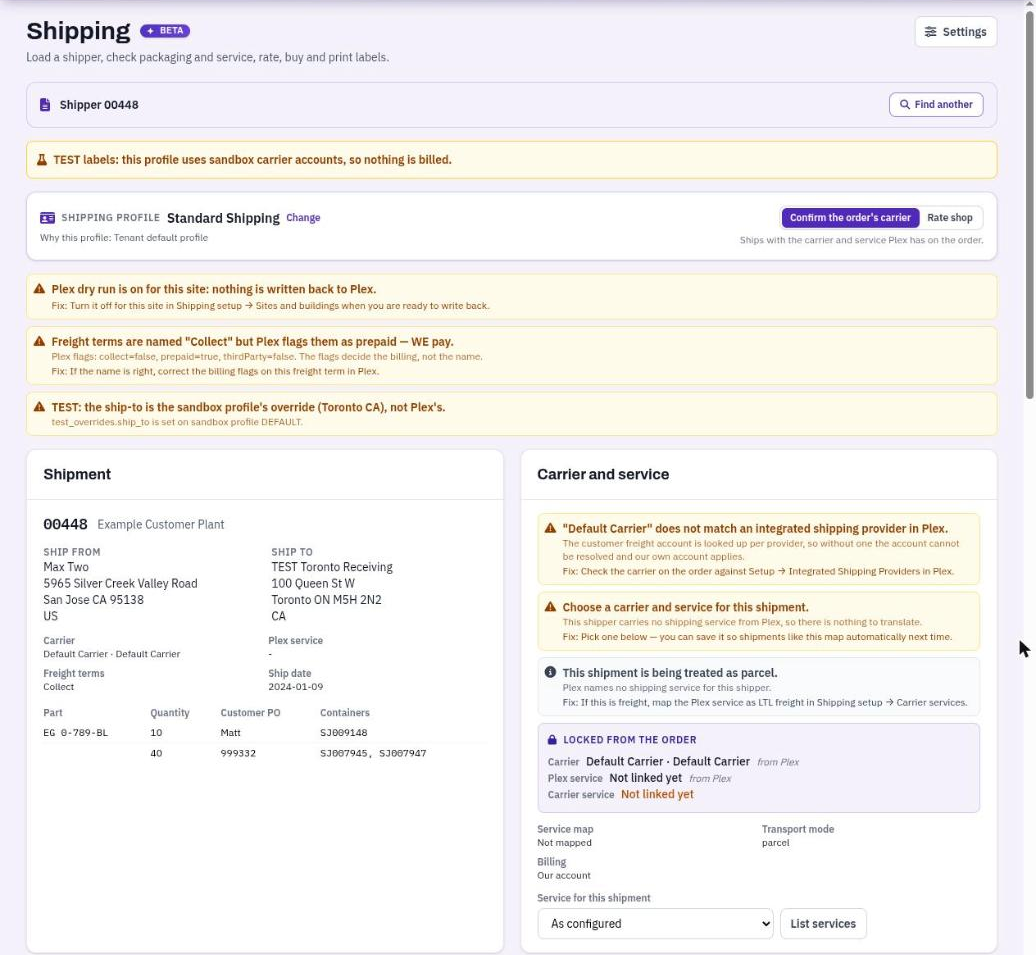
The shipping workstation with a shipper loaded.
Permissions and roles
Shipping has its own permissions. Your company's DataMagik - Security admin assigns roles in the company user manager.
- Shipping - Ship: open the workstation, load shippers, rate, track, view and print labels and paperwork, and change packaging.
- Shipping - Buy or Void Labels: buy and void labels, buy return labels, send a label's writes to Plex, release an unfinished purchase, create manifests and schedule pickups. These actions spend money.
- Shipping - Admin: the setup pages under Shipping setup, such as carrier accounts, profiles, service maps, packaging, sites and Plex dry run, and hooks. It also opens the workstation, but it does not buy labels on its own.
Two roles bundle them:
- Shipping Clerk: Shipping - Ship and Shipping - Buy or Void Labels.
- Shipping Manager: all three, so everything a clerk does plus setup.
Nobody holds either role until you assign it. Someone with Shipping - Ship but not Shipping - Buy or Void Labels can rate a shipment. The rates panel then says Your role can rate shipments but not buy labels (Shipping - Buy or Void Labels).
On the phone
The phone app uses the DataMagik Mobile permissions:
- DataMagik Mobile - Shipping and DataMagik Mobile - Parcel and LTL, or their Admin versions, open the shipping screens.
- Buying or voiding a label on the phone needs both DataMagik Mobile - Buy or Void Carrier Labels and Shipping - Buy or Void Labels, and the person's PIN. Taking Shipping - Buy or Void Labels away stops buying on the web and on the phone.
The roles DataMagik Mobile - Shipping Clerk, DataMagik Mobile - Shipping Lead and DataMagik Mobile - Admin hold everything needed to buy labels on the phone. DataMagik Mobile - Loader loads and ships shippers but cannot buy labels. The phone roles do not include Shipping - Ship, so they do not open the web workstation.
Test labels and live labels
Each carrier account is either a test (sandbox) account or a live one. A test account buys sample labels from ShipEngine that cannot ship and are never billed. A shipping profile that buys test labels uses only test accounts, and one that buys live labels uses only live accounts. A test can never buy a real label.
While a profile buys test labels, the workstation shows TEST labels: this profile uses sandbox carrier accounts, so nothing is billed. Its labels carry a TEST badge. The phone shows TEST labels · not billed.
A test label is never written to Plex, even at a site that writes to Plex.
Plex dry run
Each site has a Plex dry run switch. While it is on, labels are still bought and printed, but nothing is written to Plex: no tracking numbers, freight, carriers or master units. The transaction log records each write that would have been made, so you can check it before you go live. A new site starts with dry run on.
The workstation reminds you with Plex dry run is on for this site: nothing is written back to Plex. Turn it off on the last step of the setup wizard, or under Sites and buildings.