Who pays: freight terms and billing
Who pays: freight terms and billing
How shipping decides whose carrier account a label is billed to, and how to stop a label being billed to you by mistake.
Plex says who pays for freight. DataMagik reads it from the order every time. The Freight terms and billing page under Shipping setup holds only what Plex does not: which freight terms may ship at all, which term wins when the orders on one shipper disagree, and what each Plex bill-to code means to the carrier.
Where the freight terms come from
The shipper's freight terms come from Plex, through Freight_Terms_Get (2170). Plex's flags on the freight term decide who pays, not its name:
- Third Party Billing: a third party pays.
- Collect: the customer pays.
- Prepaid: you pay.
If more than one flag is set, third party wins, then collect. A term with none of the three flags is billed to your own account, with a warning to set the flags in Plex.
The workstation shows the term under Freight terms, and who is billed under Billing: Our account, or the party and account billed. The phone shows Freight billing.
Billing the customer's account
When Plex says the customer or a third party pays, DataMagik finds the account in Plex:
- It matches the order's carrier to an Integrated Shipping Provider set up in Plex for your PCN.
- It asks Plex for the account set up on the customer's ship-to address for that provider and those freight terms.
- It reads the account's number, postal code and country, and bills the label to it.
Set the customer's carrier accounts up in Plex, on the ship-to address, under its Integrated Shipping Provider accounts. When a customer has several accounts for one carrier, the one whose postal code is closest is used.
The account's bill-to code says who is billed. The Bill-to codes card on the setup page says what each Plex code means: We pay, The customer pays or A third party pays. Common codes are built in, such as COLLECT, CONSIGNEE, RECIPIENT and THIRD PARTY. A code that is not listed ships on your own account, with a warning. Press Add a code to add one.
A collect order billed to your own account
If the freight terms say the customer or a third party pays, but Plex has no account for this customer, ship-to, carrier and freight terms, the label would be billed to you. Shipping stops this by default. Rates are still shown, but the label cannot be bought. The message says Freight terms "…" say the customer pays, but this would be billed to your own carrier account.
To fix it, set up the customer's account for this carrier in Plex and make sure your PCN grants Customer_Address_Integrated_Shipping_Provider_Account_Get (16494).
On a new PCN this is common until Plex holds your customers' accounts. If you do ship these on your own account, relax the rule:
- In the setup wizard's Freight terms and billing step, under A collect order billed to your own account, choose Warn and let it ship. The person shipping then sees a warning and may still buy the label on your account. Choose Block it to go back.
- Or, under Shipping setup → Customs and compliance, press Adjust on the check The freight terms say the customer pays, but no customer account was found, so it would be billed to your own account. Choose Where it applies and How strong it is: Stop, Warn, Note or Off. You can relax it for one carrier or destination and keep it for the rest.
Freight terms policy
The Freight terms card lists every freight term your orders use. For each one:
- Can ship on this term: off stops any shipper with this term from shipping, and shows the note as the reason. A customer pick-up term is built in as Cannot ship, because no carrier shipment is created for it.
- Note for the person shipping: shown on the shipping screen whenever a shipper has this term. For example, a third-party term can remind people to verify the account number.
- The order of the list: when the orders on one shipper have different freight terms, the term nearest the top is used. Use Move up and Move down. Customer-pays terms usually sit at the top, because billing your own account when the customer should have paid is the expensive mistake.
Press Add a term to add one, then choose the Freight term as Plex names it on the order. A new term is added at the bottom. Reset to built in undoes your changes to a built-in term.
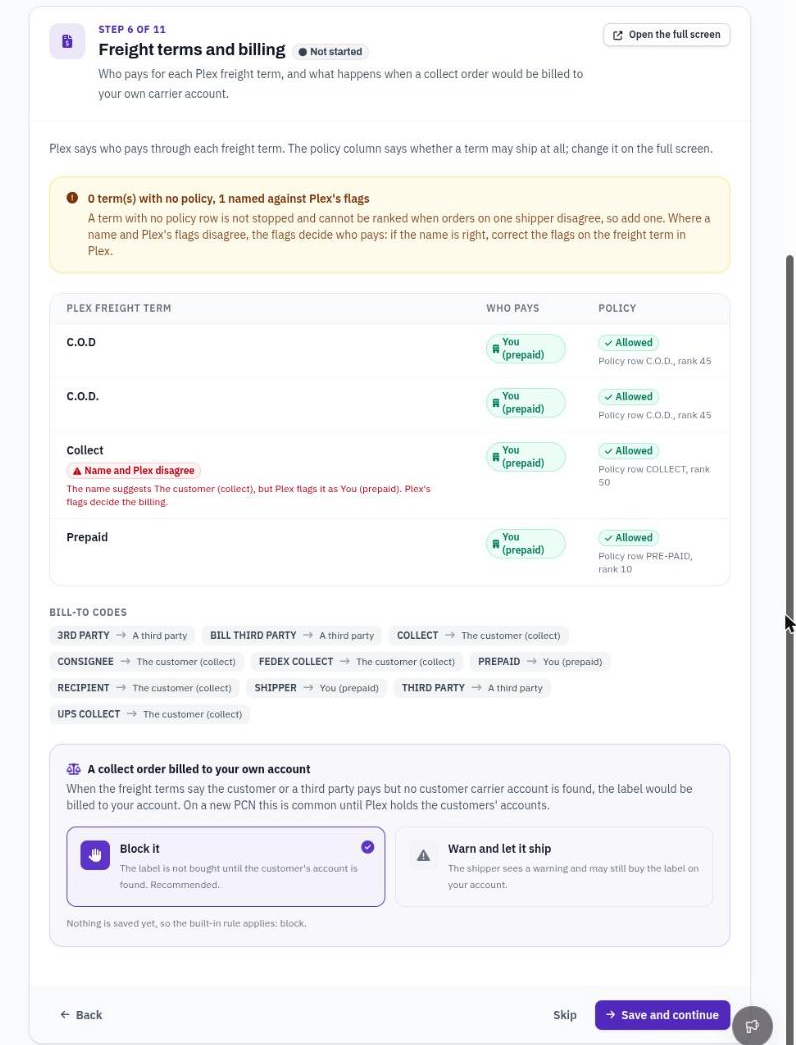
The Freight terms card, in the order that wins.
A term with no policy
A term with no row is not stopped, but nothing says whether a carrier label may be bought on it, and it cannot be ranked. You see a warning on the shipment. If the orders on one shipper have different terms and one of them has no row, the shipment is stopped until you add it. Add a row on the setup page, or press Add a policy row in the wizard's Freight terms and billing step. To stop every unlisted term instead, set that check to Stop under Customs and compliance.
A name that disagrees with Plex's flags
A term named "Collect" but flagged Prepaid in Plex is billed as prepaid, because the flags decide. The shipment shows Freight terms are named "…" but Plex flags them as …. The wizard's freight terms table marks it Name and Plex disagree. If the name is right, correct the flags on the freight term in Plex.
Freight written to Plex
After a label is bought, the shipper in Plex gets the first tracking number and the freight amount: what the carrier billed, or the quote if the carrier did not say. When the customer or a third party pays, the freight is written as zero, because the label costs you nothing. The tracking number is still written.
Nothing is written while the site's Plex dry run is on, or for a test label. A shipper Plex already shows as shipped cannot be changed, so record the tracking and freight in Plex by hand, or reopen the shipper first.