Plex data sources to grant
Plex data sources to grant
Which Plex data sources shipping reads and writes, how to check your grants, and what Plex dry run holds back.
Shipping reads your shippers, containers, freight terms and customer accounts straight from Plex through Plex data sources. It writes tracking, freight and master units back the same way. Plex must grant each data source to the DataMagik integration user for your PCN. A data source that is mapped but not granted shows up only on the first real shipment, unless you check first.
Check Plex access
Press Check Plex access on the setup wizard's Plex access step, or on the Overview under Shipping setup. The check asks Plex whether this site's integration login can use each data source shipping reads. Each read is called once with values that match nothing, so no real record is touched. Writes are never called.
The result is headed Plex access at site (PCN number). A tile for each group, Parcel, Packaging and International, says how many required reads are granted. The table below lists every data source with its Data source number, what it is Needed for, its Type (Read or Write), its Status and What Plex said.
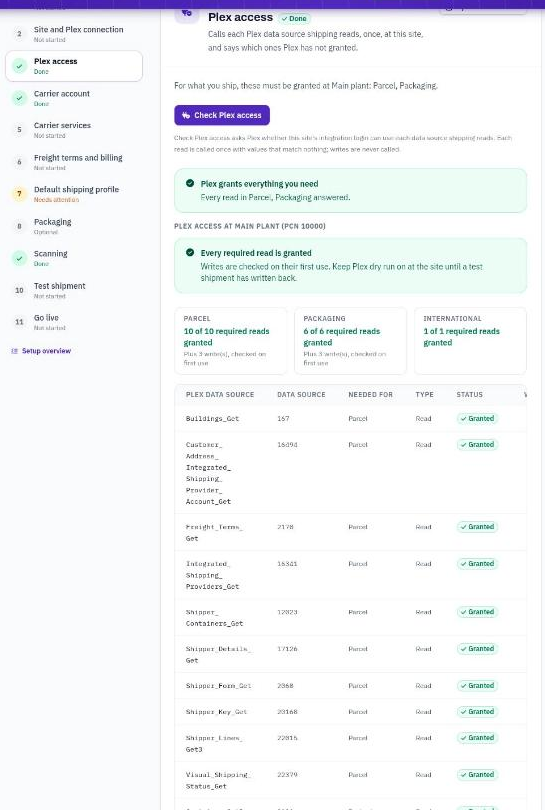
The result of Check Plex access, with every required read granted.
What each status means
- Granted: Plex answered. If the reason reads Plex answered and refused a test value, so the grant is in place., Plex rejected the check's dummy value, which still proves the grant.
- Denied: Plex refused access. The row says Ask your Plex administrator to grant data source number to the DataMagik integration user for PCN number. Grant it in Plex, then check again.
- Error: Plex answered with an error that says nothing about the grant, or Plex did not answer in time. Run the check again. If it repeats, What Plex said shows Plex's message.
- Not called: a write. Writes are checked on their first use, so test them with Plex dry run on.
- Disabled: switched off in your shipping setup and never used.
When every required read is granted, the result says Every required read is granted. Optional data sources never hold this up, but a denied one is still listed.
Required for parcel
Every parcel shipment needs these.
| Plex data source | Number | Type | What shipping uses it for |
|---|---|---|---|
| Shipper_Form_Get | 2068 | Read | The shipper: addresses, carrier, freight terms |
| Shipper_Lines_Get3 | 22015 | Read | The shipper's lines |
| Shipper_Containers_Get | 12023 | Read | The containers on a shipper line |
| Shipper_Details_Get | 17126 | Read | Every container on the shipper in one call |
| Shipper_Key_Get | 20168 | Read | A scanned or typed shipper number |
| Visual_Shipping_Status_Get | 22379 | Read | The list of open and shipped shippers |
| Buildings_Get | 167 | Read | The ship-from address |
| Freight_Terms_Get | 2170 | Read | The freight terms and who pays |
| Integrated_Shipping_Providers_Get | 16341 | Read | The carriers set up in Plex for your PCN |
| Customer_Address_Integrated_Shipping_Provider_Account_Get | 16494 | Read | The customer's carrier account, for collect and third-party billing |
| Shipper_Freight_Update | 20945 | Write | Writes the tracking number and freight to the shipper |
| Integrated_Shipping_Tracking_No_Add | 47193 | Write | Writes tracking to each package |
| Integrated_Shipping_Tracking_No_Delete | 47236 | Write | Clears package tracking when a label is voided |
Required for packaging
Needed to read container and overpack types and weights, and to build and change overpacks in Plex.
| Plex data source | Number | Type | What shipping uses it for |
|---|---|---|---|
| Container_Types_Get | 46 | Read | Container types |
| Master_Unit_Types_Get | 717 | Read | Overpack (master unit) types: dimensions and tare |
| Container_Types_Get_Full | 2361 | Read | Container type dimensions |
| Container_Type_Get | 8209 | Read | Re-reads a container type before booking |
| Container_Get3 | 9121 | Read | One container by its serial |
| Master_Unit_Info_Get | 18881 | Read | One overpack's type, tare and location |
| Control_Panel_Container_Update | 12199 | Write | A box's container type and weight |
| Logistics_Master_Unit_Build | 20522 | Write | Builds a new overpack |
| Master_Unit_Update | 13066 | Write | Changes an overpack's type |
Required for international
Needed when you ship across a border. The commercial invoice, part names and country codes below under Optional make customs data more complete.
| Plex data source | Number | Type | What shipping uses it for |
|---|---|---|---|
| Releases_Get | 5565 | Read | Order, release and price, for the declared value |
Optional
Shipping works without these, but each one adds something. Grant the ones you need.
| Plex data source | Number | Type | What it adds |
|---|---|---|---|
| Shipper_Form_Commercial_Invoice_Get | 10389 | Read | Incoterms, currency and tax IDs from the commercial invoice. Without it, the profile's incoterm and currency are used. |
| Parts_Get_All | 142 | Read | The part name for the customs description. Without it, the packing list's or release's part name is used. |
| Country_Codes_Get | 18908 | Read | Country codes. Without it, common country names are still recognized. |
| Shipper_From_Container_Get | 230933 | Read | Scanning a container finds its shipper. Without it, a container scan cannot find the shipper. |
| Trucks_Picker_Get | 1154 | Read | The truck list on the workstation |
| Master_Unit_Containers_Get_By_Key | 11190 | Read | What is on an overpack |
| Master_Units_Picker_Get | 5737 | Read | A scanned overpack number |
| Master_Unit_Part_Get | 231126 | Read | An overpack's current type and tare in one call |
| Shipper_Master_Unit_Tare_Get | 3062 | Read | Combined tare weight. Without it, tare is worked out from the types. |
| Integrated_Shipping_Account_Get | 16468 | Read | The customer account's postal code and country, for collect and third-party labels |
| Customer_Address_Integrated_Shipping_Provider_Accounts_Get | 16495 | Read | All carrier accounts for a ship-to address |
| Integrated_Shipping_Service_Types_Get | 16349 | Read | Plex's service types, including its LTL flag |
| Carrier_Integrated_Shipping_Services_Picker_Get | 2174 | Read | A carrier's Plex services, for the service map |
| Integrated_Shipping_Bill_To_Types_Get | 16364 | Read | Plex's bill-to codes |
| Carriers_Get | 334 | Read | Carriers with their SCAC |
| Shipper_Packing_List_Lines_Get | 14140 | Read | Part names, HS codes and origin for customs |
| Shipper_Deliveries_Detail_Get | 230865 | Read | Line prices for the customs value |
| Part_Attribute_By_Name_Get | 9635 | Read | HS code and origin kept as part attributes |
| Order_Line_Get | 4381 | Read | Listed so the check reports its grant |
| Harmonized_Tariff_Codes_Get | 2994 | Read | HS code validation, off unless you ask for it |
| Container_Type_Update | 2360 | Write | Saves container type dimensions into Plex instead of only in DataMagik |
| Master_Unit_Type_Update | 11583 | Write | Saves overpack type dimensions into Plex |
| Container_Type_Add | 2358 | Write | Adds a container type |
| Master_Unit_Type_Add | 11581 | Write | Adds an overpack type |
| Container_Update_Simple | 6423 | Write | Container type and weights |
| Container_Attributes_Modify | 7774 | Write | Container weights and physical attributes |
| Master_Unit_Remove | 11083 | Write | Takes a box off an overpack |
Truck_Get (8740) and Truck_Update (8733) show as Disabled. They are used only when a profile writes the carrier to the Plex truck.
Plex dry run
The check only proves the reads. Writes are proved by a test shipment. While a site's Plex dry run is on, every write is skipped and the transaction log records what would have been written:
- the tracking number and freight on the shipper,
- the tracking number on each package,
- overpacks built, retyped or changed,
- box types and weights.
Reads still happen, and labels are still bought and printed. Keep dry run on until a test shipment shows the writes you expect in the Transaction log. Then turn it off on the setup wizard's Go live step, or under Sites and buildings. Turning it off asks you to confirm.
Plex limits rows: each Plex data source returns a limited number of rows. If the shipper's containers or the list of open shippers come back cut off, shipping stops rather than ship, weigh or list less than is there. See Troubleshooting.