Transaction hooks on the phone
Transaction hooks on the phone
Run your own scripts around what people do in DataMagik Mobile: stop a transaction that should not go to Plex, change what is sent, or start follow-on work once Plex has accepted it.
Every transaction on the phone, such as moving a container or shipping a shipper, works the standard way. A hook adds one of your company's scripts to it. You set hooks up on the DataMagik website under DataMagik Mobile → Transaction hooks, which needs DataMagik Mobile - Mobile Admin Settings and the DataMagik Mobile license. Hooks belong to your company and run for every site and every phone.
A company with no hooks sees no change: every transaction goes to Plex as it always did.
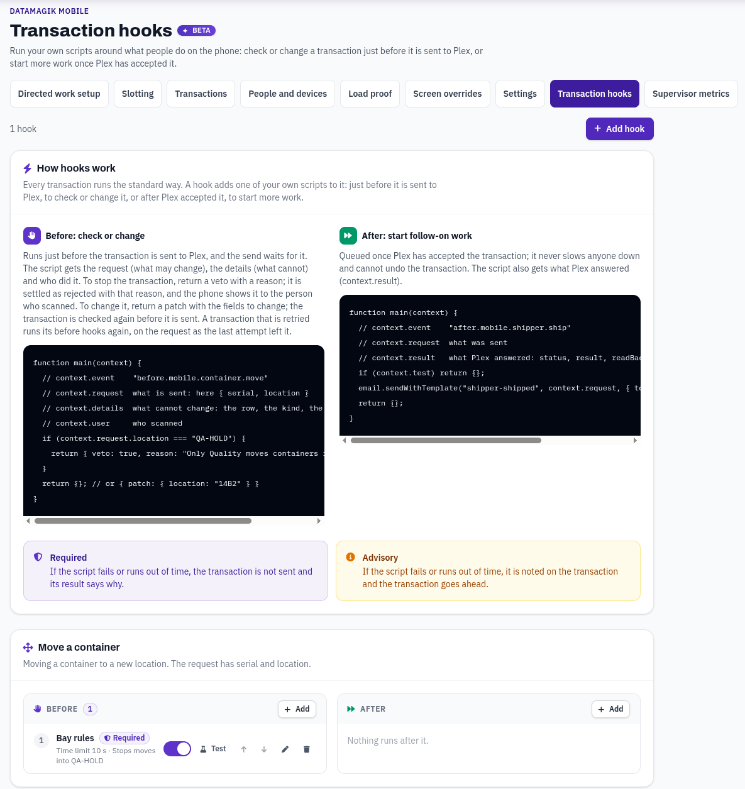
Before and after
- Before hooks run just before the transaction is sent to Plex, after DataMagik's own checks have passed, and the send waits for them. A before hook can let the transaction go ahead, change what is sent, or stop it with a reason.
- After hooks are queued once Plex has accepted the transaction and run in the background. They never slow anyone down and cannot undo the transaction. Use them for follow-on work, such as sending an email or updating another system.
The phone sends a transaction as soon as it is scanned, or later if the phone was offline, so a before hook runs when the transaction reaches the server, and the phone's screen does not wait for it. If a hook stops the transaction, the phone shows it as refused, with the hook's reason, the same way it shows a transaction Plex refused. See What the person scanning sees.
The transactions you can hook
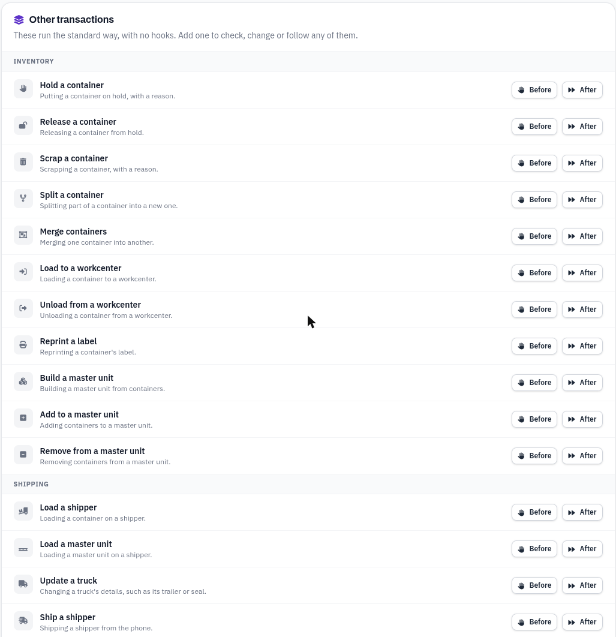
| Group | Transactions |
|---|---|
| Inventory | Move a container, Hold a container, Release a container, Scrap a container, Split a container, Merge containers, Load to a workcenter, Unload from a workcenter, Reprint a label, Build a master unit, Add to a master unit, Remove from a master unit |
| Shipping | Load a shipper, Load a master unit, Update a truck, Ship a shipper |
| Maintenance | Raise a maintenance request |
Parcel and LTL labels bought on the phone are not on this list: they run your Shipping hooks, the same as on the web.
Several hooks on the same transaction run in the order the page lists them. Use the up and down arrows on a hook to change the order.
Setting up a hook
- Write the script under Script Engine → Scripts. It is an ordinary script with a
main(context)function. The hook editor lists your company's active scripts. - Open DataMagik Mobile → Transaction hooks and press Add hook, or press Before or After beside a transaction.
- Pick the Transaction, When it runs (Before or After) and the Script. Add a Note saying what the hook is for, so the next person knows.
- For a before hook, choose what happens If the script fails:
- Required: if the script fails or runs out of time, the transaction is not sent and its result says why.
- Advisory: the failure is noted on the transaction and the transaction goes ahead.
- For a before hook, set the Time limit, from 1 to 30 seconds. A hook that takes longer counts as failed. All the before hooks on one transaction share 30 seconds between them.
- Press Test this script to run it once before you save. See Testing a hook.
- Press Save hook.
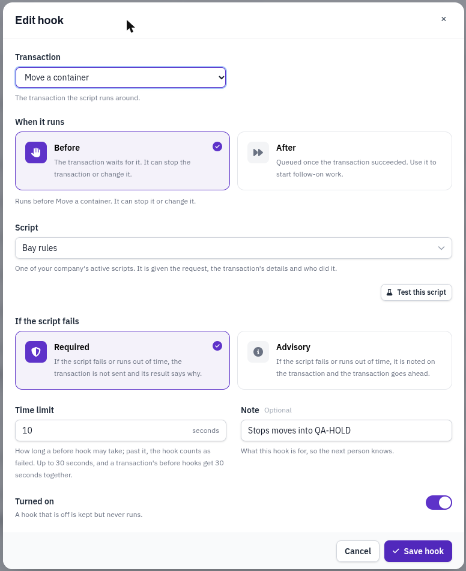
A new hook starts as Required with a 10-second Time limit, and is Turned on as soon as you save it. To save it without it running yet, switch off Turned on first. A hook that is off is kept but never runs. To remove a hook, press its trash can and confirm.
If the script fails and Time limit appear for every hook but apply to before hooks only. An after hook runs in the background with the script's own time limit, and its failure never affects the transaction.
What the script gets
| Field | What it holds |
|---|---|
context.event | The hook's event: before. or after. and the transaction, for example before.mobile.container.move. |
context.transaction | The transaction, for example mobile.container.move or mobile.shipper.ship. |
context.companyId, context.siteId | Your company and the site, as text. |
context.ref | The transaction's record, for example mobile_tx:1219836562576703489. |
context.request | What the phone is sending, for example { serial, location } for a move. A before hook can change it. |
context.details | Facts that cannot change: the kind of transaction, the transaction's id, the device and which attempt this is. |
context.result | After hooks only: what Plex answered, as { status, result, readBack, dataSourceId }. |
context.user | Who scanned, as their first and last name. In a test, it is your own user name. |
context.surface | mobile, or setup_test for a test from the Transaction hooks page. |
context.test | true for a test. |
Each transaction sends different fields in request. To see exactly what yours gets, press Test and open What the script was given.
Example: before moving a container
{
  "event": "before.mobile.container.move",
  "transaction": "mobile.container.move",
  "companyId": "1",
  "siteId": "1196581223675559937",
  "ref": "mobile_tx:1219836562576703489",
  "request": { "serial": "SJ008486", "location": "ENG007" },
  "details": { "kind": "container.move", "txId": "1219836562576703489", "deviceId": "", "attempt": 1 },
  "user": "Jane Smith",
  "surface": "mobile"
}
What the script returns
A before hook returns one of these:
{}: the transaction goes ahead as it is. Returning nothing is the same.{ veto: true, reason: "…" }: the transaction is not sent. It is settled as rejected with Stopped by a hook: followed by your reason, or the hook gave no reason. if there is none. The phone shows it to the person who scanned.{ patch: { field: value } }: the transaction goes ahead with those fields ofrequestchanged or added. The change is saved on the transaction, which is checked again before it is sent. For example, if a hook changes a split, merge or load to a container that is on hold, it is refused, just as if that container had been scanned.
When a hook changes a transaction, its result in Transactions says which fields, for example A hook changed location. If a change leaves the transaction invalid, it is refused and not sent.
Any other object without veto or patch, such as { done: true }, also lets the transaction go ahead. If the script throws an error, runs out of time, or returns something that is not an object (text, a number, true/false or a list), the hook has failed, and its Required or Advisory setting decides what happens. A required hook that fails refuses the transaction with Not sent to Plex: hook … failed, and it is required: and the error. This is final: the transaction is not retried, so the person has to scan again once the script is fixed. Keep the Time limit of a required hook well above how long the script takes. An advisory hook that fails adds Hook … failed (…); it is advisory, so this went ahead. to the result. In these messages, "hook" is followed by the hook's number, not the script's name. What an after hook returns is not used. If an after hook cannot be queued, After hook … could not be queued is added to the result; the transaction is still done.
If DataMagik cannot read your company's hooks at that moment, the transaction is not sent: it fails with Not sent to Plex: the hooks could not be read and is tried again automatically.
A transaction that is retried, for example because Plex could not be reached, runs its before hooks again on the request as the last attempt left it. Write before hooks so they are safe to run twice.
Example: stop moves into a quality location
function main(context) {
  if (context.request.location === "QA-HOLD") {
    return { veto: true, reason: "Only Quality moves containers into QA-HOLD." };
  }
  return {};
}
Example: after shipping a shipper
function main(context) {
  if (context.test) return {};
  email.sendWithTemplate("shipper-shipped", context.request, { to: "shipping@example.com" });
  return {};
}
Testing a hook
Press Test on a hook in the list, or Test this script in the hook editor. Test runs a hook whether it is turned on or not. The script runs once, straight away, with the context a real run would get.
That context is built from your company's latest transaction of that kind, and the result says so, for example Built from your latest Move a container transaction with its date and time. If there is none of that kind yet, the test uses a made-up transaction with an empty request, so a hook that changes fields is best tested once there is a real transaction of that kind.
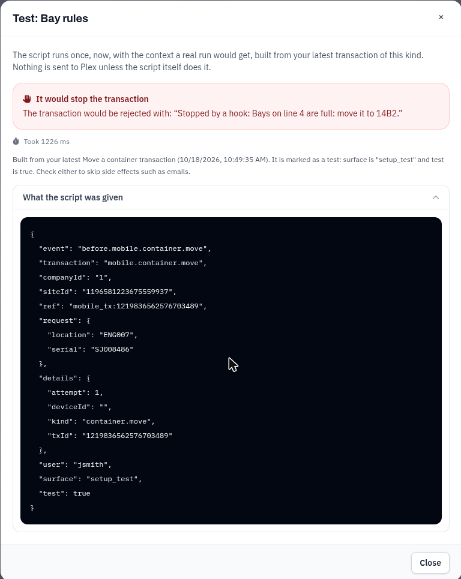
A test is marked so your script can tell: context.surface is setup_test and context.test is true. Nothing is sent to Plex, but anything the script itself does, such as sending an email, still happens unless it checks for a test.
The result shows what the script answered: go ahead, the changes it would make, or the reason it would stop the transaction. A change that would leave the request invalid is shown as a failure. Checks that need Plex, such as whether a container is on hold, happen only on a real send. Test this script uses the Time limit in the editor; Test on a saved hook uses its saved one. An after hook runs straight away in a test so you can see what it does; in a real transaction it runs once Plex has accepted it.
What the person scanning sees
Hooks run on DataMagik, not on the phone, and the phone does not wait for them. This is how they meet the person scanning:
- When a hook runs. A before hook runs when the scan reaches DataMagik: straight away when the phone has signal; for a held scan (merges, loading onto a shipper, shipping and dock door auto-loads) when its 10-second Undo ends, or sooner if the next scan is made or the person signs out; or once a phone that was offline reconnects. A held scan undone within its 10 seconds never reaches DataMagik, so no hook runs for it.
- A stopped scan. A veto, or a required hook that failed, shows on the phone as the red Not done in Plex card with the result, for example Stopped by a hook: Only Quality moves containers into QA-HOLD. It stays in My work under Needs a fix until the person taps OK. Write the reason for the person holding the scanner: say what to do next.
- A changed scan. A hook's change is not shown on the phone: the receipt still says what was scanned. The change is written on the transaction's Result under DataMagik Mobile → Transactions.
- Undo. Undo of a move sends a move back to where the container was (when the phone knows it), and Undo of a workcenter load sends an unload, so the Undo runs your Move a container or Unload from a workcenter hooks. A hook that stops every move also stops the Undo of a move.
- Tried again. A transaction that failed, because Plex could not be reached or the hooks could not be read, is tried again automatically, up to 3 tries, and runs its before hooks again each time. Write before hooks so they are safe to run twice.
Seeing what a hook did
- DataMagik Mobile → Transactions: a transaction a hook stopped has the status rejected, with Stopped by a hook: and the reason under Result. A hook's change, or an advisory hook that failed, is written in the same Result. Use Refused and failed to find them.
- Script Engine → Executions: every run of a hook, real or test, is kept with the script's runs, tagged transaction_hook. Open a run to see its Input (the exact context), its Console and its Output. This is also where you see how an after hook ended.