Allowed hosts: send a key without revealing it
Give an API key the hosts it may be sent to, and let the platform add it to the request.
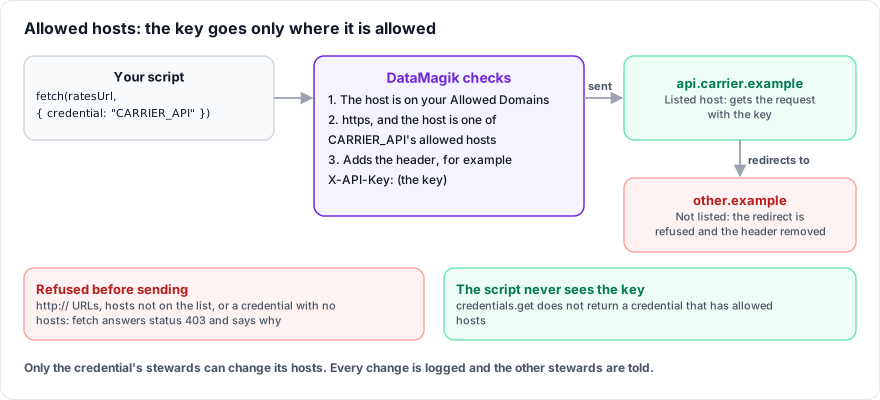
Most API keys only need to be sent in a header to one service. With allowed hosts, a script names the credential instead of reading it, and DataMagik adds the header itself, only over https and only to the hosts you list. The script never has the key, so it cannot log it or send it anywhere else.
Set a credential's hosts
Who can do this: the credential's stewards: its named stewards or, with none named, the company's own admins. Administrators of a parent company never can by inheritance. Every change is recorded on the credential's Activity tab and the other stewards are notified.
- Open Script Engine › Credentials and edit the credential, or add a new one. It must be an API Key, Bearer Token, Basic Auth, Password, OAuth Token or Secret.
- In Send it only to these hosts, enter the Hosts (one per line), such as
api.carrier.example. - Set the Header the service expects, such as
AuthorizationorX-API-Key. - Set the Header value, with
{value}where the key goes:Bearer {value},Basic {value}or just{value}. - Press Save Credential. The credential and its hosts are saved together, or neither is.
Only add hosts you trust. A host that echoes request headers back, such as a test or debug endpoint, or an error page that quotes them, returns the key to the script that called it.
Host rules
- Enter a host name:
api.example.com, or*.example.comfor any name below it. Nohttps://, paths or IP addresses. *.example.comdoes not matchexample.comitself. A wildcard cannot cover a whole public suffix, such as*.com.- Add a port only if it is not 443. The port must match exactly.
- Up to 20 hosts.
- Platform-controlled headers, such as
HostorContent-Type, cannot be used.
Use it from a script
function main(context) {
  const resp = fetch("https://api.carrier.example/v1/rates", {
    method: "POST",
    credential: "CARRIER_API",
    headers: { "Content-Type": "application/json" },
    body: JSON.stringify({ zip: context.zip, weight: context.weight })
  });
  if (!resp.ok) {
    return { success: false, script_message: resp.error || ("HTTP " + resp.status) };
  }
  return { success: true, data: resp.json() };
}- The host must also be on your company's allowed domains.
- If the script sets a header with the same name, it is dropped and the credential's header is used.
fetchAsynctakes the same option.credentials.getdoes not return a credential that has allowed hosts. It throws an error telling you to usefetch(url, {credential: "NAME"}).
When the request is refused
Nothing is sent, and fetch answers with status 403 and an error that says why:
| Error | Fix |
|---|---|
credential "X" may not be sent to host: it is only sent over https to the hosts listed on the Credentials page | Use https, or ask a steward to add the host. |
credential "X": the credential has no hosts it may be sent to … | Ask a steward to add hosts under Send it only to these hosts. |
credential "X": no credential by that name is available to this script | Check the name, and that the script may use the credential. |
Redirects
Each redirect is checked. A redirect to a host, port or scheme the credential may not be sent to is refused, not followed, and the header is removed first: redirect refused: the request with credential "X" was redirected to host, which it may not be sent to. At most 5 redirects are followed.
Dashboard webhooks and API Bridge
Dashboard webhooks and API Bridge resources that use a credential also send it only to its allowed hosts, over https, and refuse redirects to other hosts. Saving one that would send a credential with no allowed hosts is refused.
Frequently asked questions
Do allowed hosts replace allowed domains?
No. Allowed domains are the hosts any script in the company may call. Allowed hosts are where one key may be sent. A request with a credential must pass both.
Can a Site use the parent's API key this way?
No. Only Plex logins can be shared with Sites. A Site adds its own API key.