Sharing credentials with Sites
Let a Site use the parent's Plex logins without ever seeing them, and connect the credentials that copied items need.
Share a Plex login with a Site
Who can do this: a parent administrator: DataMagik - Security in the parent, as a home member.
- In the parent, open Admin → Sites and choose the Credentials tab.
- In parent credentials each Site may use, find the credential and the Site's column.
- Choose Reads or Reads and writes.
- Under Plants this Site may use it for, pick the Site's plant. Nothing is shared until a plant is picked.
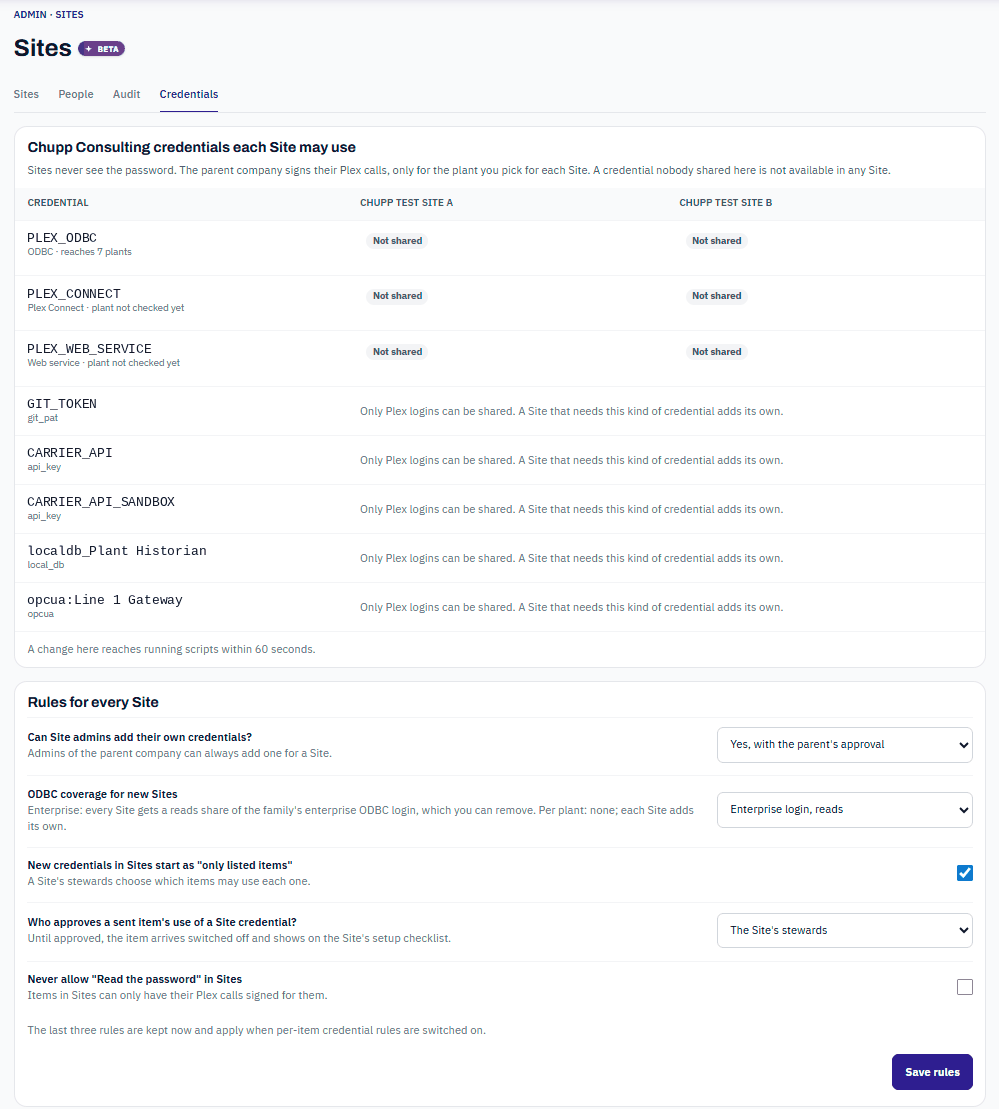
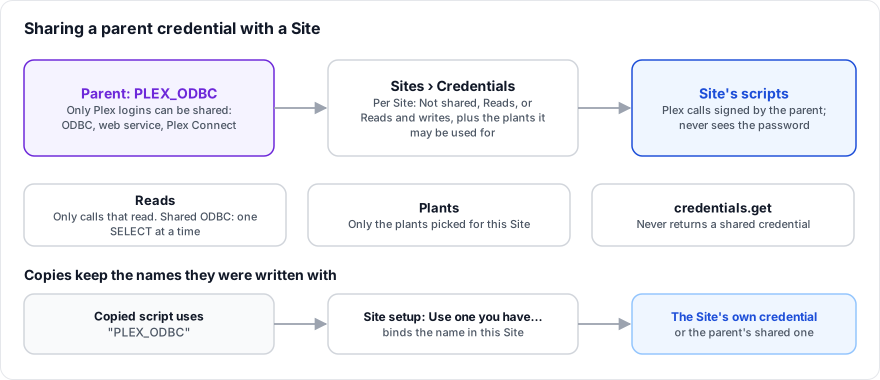
- Only Plex logins can be shared: ODBC, web service (Basic Auth) and Plex Connect. A Site that needs another kind of credential adds its own.
- Sites never see the password. The parent company signs the Site's Plex calls.
credentials.getnever returns a shared credential. - Reads allows only calls that read. A shared ODBC login only runs single SELECT queries.
- Plants: the login can only be used for the plants you pick, and only plants DataMagik has confirmed the login reaches. Use Check now on the credential to confirm its plant first; a plant marked Not reached by this login cannot be used.
- If a Site has its own credential with the same name, the Site's own is used.
A change reaches running scripts within 60 seconds. To stop sharing, choose Not shared.
Rules for every Site
Below the table, Rules for every Site sets how Sites handle credentials. Press Save rules after changing them.
| Rule | Choices (default first) |
|---|---|
| Can Site admins add their own credentials? | Yes, with the parent's approval: the credential is saved switched off until a parent administrator approves it under Credentials waiting for approval. The approver never sees the password. Or Yes, or No, only the parent adds them. Parent administrators can always add one for a Site. |
| ODBC coverage for new Sites | Enterprise login, reads: every new Site gets a Reads share of the family's enterprise ODBC login, which you can remove. Pick each Site's plant for it to take effect. Or Per plant: each Site adds its own. |
| New credentials in Sites start as "only listed items" | On: a Site's stewards choose which items may use each new credential. |
| Who approves a sent item's use of a Site credential? | The Site's stewards, or the Site's stewards or the parent's admins. Until approved, the item arrives switched off and shows on the Site's setup checklist. |
| Never allow "Read the password" in Sites | Off. When on, items in Sites can only have their Plex calls signed for them. |
As the page says, the last three rules are kept now and apply when per-item credential rules are switched on for your Sites. See Credential rules.
Bindings: the names copied items use
A copied item keeps the credential name it was written with, such as PLEX_ODBC. In the Site, that name is bound to a credential the Site can use: its own, or one the parent shares. A binding never gives an item more than the Site may use.
A Site can also bind its default login of a type. For example, a Site may make the parent's shared ODBC login its default ODBC login. It stays read-only and limited to the Site's plants, exactly as when it is used by name.
The Site setup checklist
Who can do this: DataMagik - Security in the Site. Parent administrators can finish these too.
In the Site, open Admin → Site setup. Finish setting up Site shows N of N ready and lists:
- Credentials the items need, each Ready, Shared or Waiting for approval, and how many items it blocks. For a missing one, press Add credential to create it with the name filled in, or choose Use one you have… and press Use to bind the name to an existing credential.
- Items that arrived switched off.
- Waiting for a steward and Waiting for your parent company.
The checklist explains why a shared login is not enough when it is not, for example An item reads the value itself, which a shared credential never gives. This Site needs its own. A change here reaches running items within a minute.
Frequently asked questions
Can a Site read the parent's ODBC password?
No. A shared login only ever signs the Site's Plex calls. Nobody in the Site, including its admins, can read it.
Why does a copied script say a credential is missing?
The Site has no credential by that name and nothing is bound to it. Finish it on Admin → Site setup.