Enterprise overview and usage by Site
One view of every plant in the family, and how each Site uses the shared plan.
Enterprise overview
Who can do this: DataMagik - Security or DataMagik - Enterprise Viewer in the parent. The page is not available inside a Site.
In the parent, press Enterprise in the top bar. The page lists every plant of the parent and its Sites, read live from Plex, with headline figures for each.
- Choose the period: Yesterday, Last 7 days or Month to date.
- The cards show OEE, all plants (weighted by planned time), Scrap rate and On-time delivery.
- The Plants table lists each plant with its Company, PCN, OEE, Scrap and On-time, and a total for All answered plants.
- The coverage line, such as 7 of 7 plants answered, says how many plants returned figures. A plant that did not answer is left out of the totals.
How fresh is it? The figures are read live from Plex's reporting copy, which runs about 4 hours behind. This is not live shop-floor state. Nothing is stored: each visit reads again.
Ask about your plants
Use the questions on the right, or type your own, such as Which plant had the worst OEE in the last 7 days, and why? The assistant answers from the same live figures and says which plants answered and how fresh the data is. It needs DataMagik - Builder, DataMagik - Viewer or DataMagik - Enterprise Viewer in the parent.
Usage across the family
The parent and its Sites share one plan: documents, automation API calls, storage and Shop Floor workcenters from every company count against the same limits.
The Shared pool card
Open Usage Dashboard in any company of the family. The Shared pool card shows how full each shared limit is. The cards above it show the current company alone.

- In a Site, you see your own numbers and how full the shared pool is. Past a limit, extra use is billed to the parent as overage; nothing is blocked.
- In the parent, press Usage by Site on the card, or open Admin → Sites: usage.
Usage by Site
Who can do this: a parent administrator: DataMagik - Security in the parent. Only the parent's admins see the split by company.
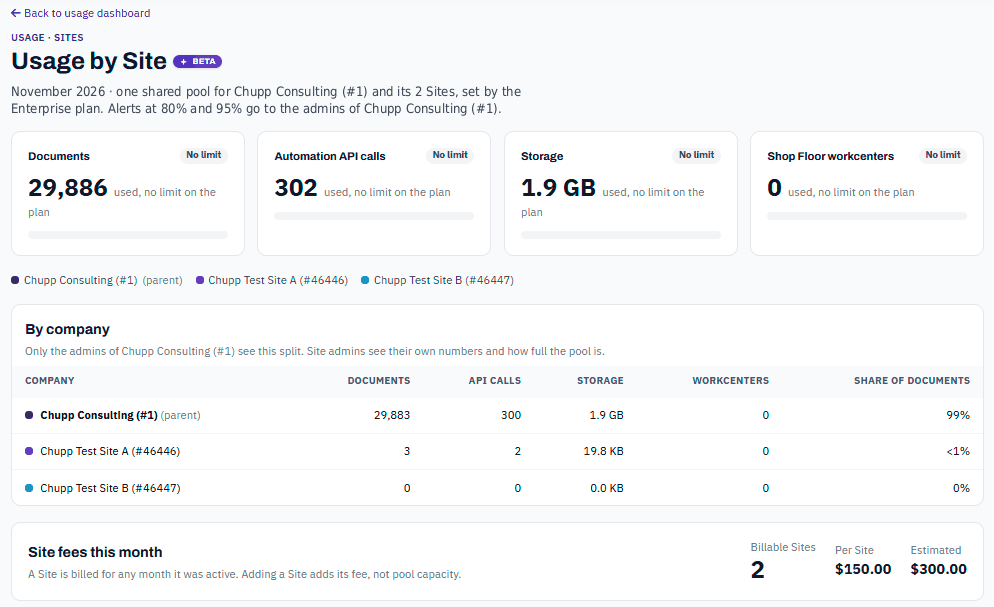
- The meters show each shared limit, or No limit if your plan has none.
- By company lists the parent and each Site with their documents, API calls, storage, workcenters and share of documents.
- Site fees this month shows the Billable Sites, the fee Per Site and the Estimated total. A Site is billed for any month it was active. Adding a Site adds its fee, not pool capacity.
Quota alerts at 80% and 95% of a limit go to the parent's administrators.