Published apps and credentials
A published app is approved when it is published. Its users need permission to use the app, not access to the credential.
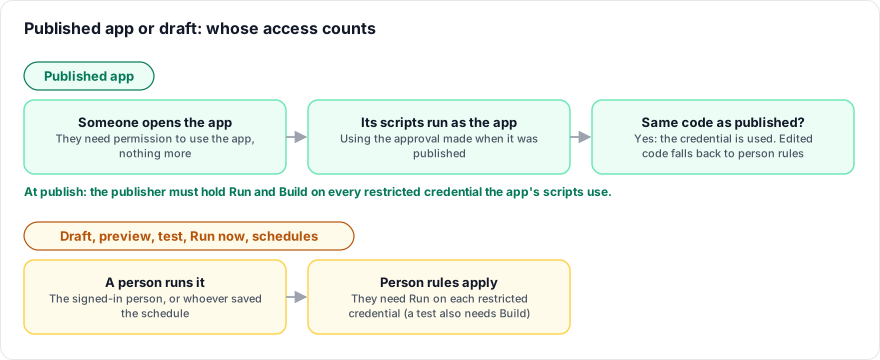
When you publish
Publishing an app checks the publisher. For every restricted credential the app's scripts use (including scripts they start), the person publishing must hold Run and Build. While a credential is in its trial, a publisher without them can still publish: the publish goes ahead and is counted on the credential's Activity tab. Once a steward has enforced the credential, publishing without them is refused:
publishing this app needs run and build access to the restricted credential "X", which you do not have; ask a steward of the credential
In an approval workflow, the person checked is the approver who publishes it.
When people use the app
- Anyone who may open the app runs the scripts its publisher approved, at the code they had when it was published.
- They do not need access to the credential, and their runs are not counted as refusals.
- Someone who may not open the app cannot run its scripts at all.
The credential's People tab lists Published apps that use it: Published app name vN, approved by person on date.
When person rules apply instead
The app's approval covers only the published version, as published. The normal person rules apply to:
- drafts and previews, test runs and Run now;
- schedules and other saved triggers;
- code that changed after publishing, or code the approval did not cover;
- a credential restricted after the app was published, until the app is published again.
Publishing again checks the publisher again.
Troubleshooting
"the person who published this app may not run with it"
The publisher no longer holds Run on a credential the app uses. Someone with Run and Build on it publishes the app again.
The app works for users but not in preview
Preview uses your own access. Ask a steward for Run on the credential, or test with the published app.