Trial and enforcement
Try a rule for 14 days without blocking anything, then enforce it.
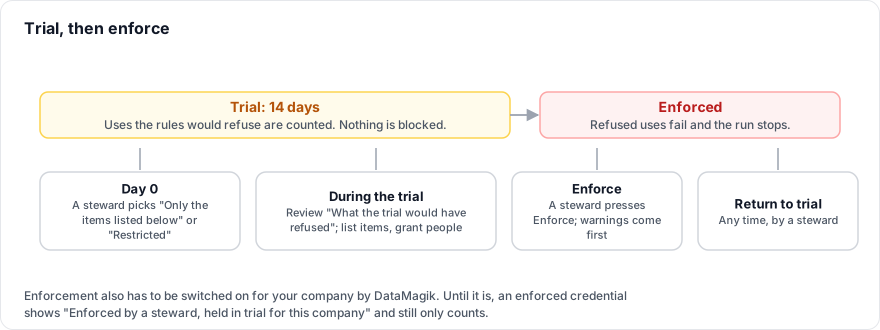
The trial
A trial starts when a steward chooses Only the items listed below on the Items tab or Restricted on the People tab. Turning a rule on again restarts it.
- For 14 days, every use, save or view the rules would refuse is counted as would be refused, with the person, the item and what started it. It still goes ahead.
- The rules page shows Trial: N days left, and the box at the top lists What the trial would have refused.
- Item rows show N would be refused, and the People tab shows the people who would no longer run with it.
Use the trial to list the items and grant the people that should keep working.
Enforce
Who can do this: the credential's stewards.
- Review What the trial would have refused and fix the lists.
- Press Enforce.
- If there is anything to look at, DataMagik warns you first, for example that the trial still has days left, that uses during the trial would have been refused, or that Locations, label connections or file triggers with no person would be refused. Press Enforce anyway if you are sure.
The page then says Enforced: uses its rules do not allow are blocked, and the other stewards are notified. To go back, press Return to trial.
Enforcement is being switched on company by company. Until DataMagik switches it on for your company, an enforced credential shows Enforced by a steward, held in trial for this company: uses are still only counted. Your stewards can review and enforce now, and the rules take effect as soon as it is switched on.
What a refused run looks like
When an enforced rule refuses a use, the call fails and the run stops with an error that starts with credential refused: and ends A steward of the credential can grant access on its rules page (Script Engine › Credentials). The middle says why:
| The error says | Why | What to do |
|---|---|---|
credential "X" is restricted, and the person this run acts for may not use it | The credential is Restricted and the person behind the run has no Run. | A steward grants the person (or their role) Run on the People tab. |
… and the person testing this code may not run and build with it | A test run needs Run and Build. | A steward grants Run and Build. |
credential "X" can only be used by the items listed on it, and this item is not one of them | The item is not on the list. | A steward adds it, or press Request access in the editor. |
… and its grant for this item only reads | The item is listed with Read from Plex but tried to write. | A steward changes the level to Read and write. |
… this version of the item's code has not been approved by a steward to read it | Read the password, but this code is not approved. | A steward approves the waiting version. |
… the person who published this app may not run with it; it must be published again by someone who may | A published app's publisher did not hold Run. | Someone with Run and Build publishes the app again. |
| a credential this item needs is not available to you | You may not see the credential, so its name is hidden. | Ask your administrator which credential the item uses. |
Grants and rule changes take effect within a minute. Saved schedules and automations keep their saved approval until they are saved again, and published apps keep theirs until they are published again.
If your license changes
If credential controls leave your license, rules already set stay enforced and become read-only. They never fall open.