Creating and managing Sites
Create Sites yourself, switch between them, and choose where you start each day.
Create a Site
Who can do this: a person whose home company is the parent and who holds DataMagik - Security there. Your license must include Sites, and DataMagik must have given you an allowance.
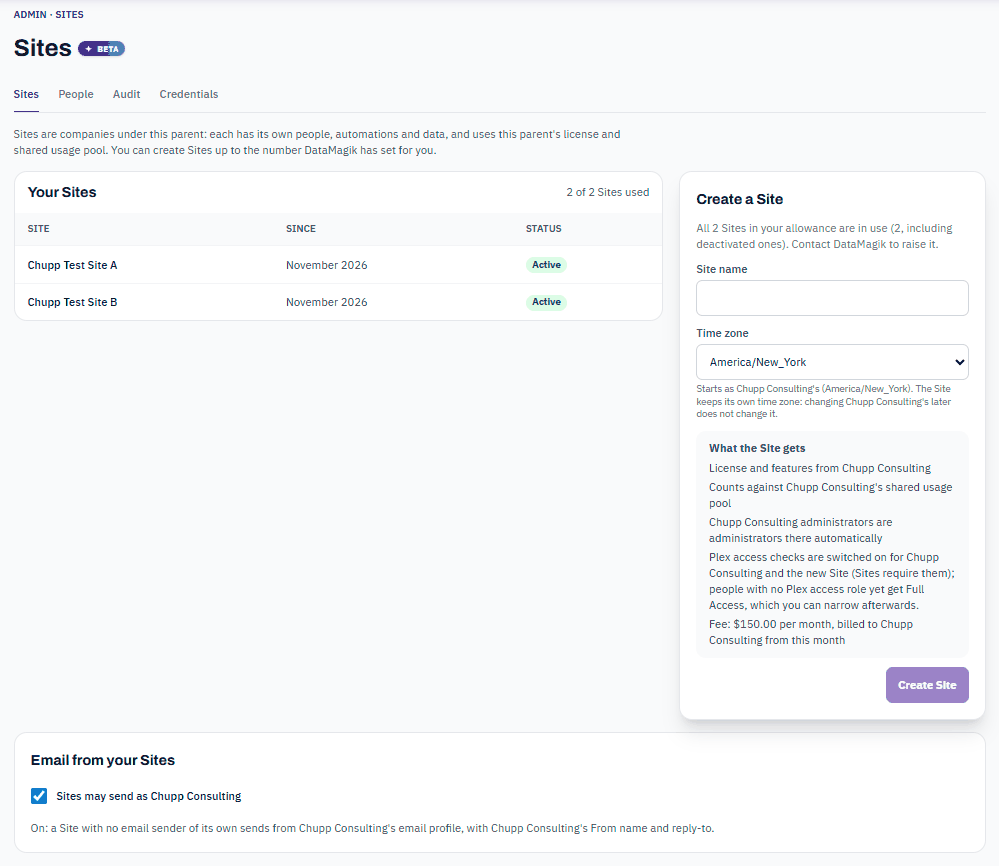
- In the parent, open Admin → Sites.
- Under Create a Site, enter the Site name.
- Choose the Time zone. It starts as the parent's. The Site keeps its own time zone: changing the parent's later does not change it.
- Read What the Site gets: the license and features, the shared usage pool, automatic administrators, Plex access checks and the monthly fee.
- Press Create Site.
The new Site is an empty company that uses the parent's license and shared pool from this month. Switch to it from the company menu to set it up.
Rules when creating a Site
| Rule | What you see if it is broken |
|---|---|
| Every Site needs a name, up to 200 characters. | Nothing was created: give the new Site a name. |
| Every Site needs a time zone. | Nothing was created: choose the new Site's time zone. |
| Names are unique within the family: no two companies in it may share a name. | Nothing was created: your company or one of its Sites already uses that name. Pick another name. |
| You can create Sites up to your allowance. Deactivated Sites count. | … Sites are already in use, including deactivated ones. Contact DataMagik to raise the allowance. |
| Only a parent can have Sites. | Nothing was created: this company is itself a Site, and a Site cannot have Sites of its own. |
Tip: The time zone decides which day a Site's schedule failures, automation failures and assistant answers are counted in. Pick the plant's own time zone, not the head office's.
Switch between the parent and its Sites
The company switcher in the top bar lists the family together under Name family: the Parent first, then each Site of parent. Companies you belong to outside the family are under Other companies. Deactivated Sites are not listed.
- A Site where you are an administrator only because you administer the parent shows Inherited admin.
- The parent's row lists its Locations, so you can tell plants and Sites apart.
In DataMagik Extend, each company can have a Plex PCN. On a Plex page with that PCN, Extend switches to the matching company or Site by itself. If no company has that PCN, or more than one could match, Extend stays where it is. An administrator sets the PCN on the Security Settings page of the parent or of the Site; to set a Site's PCN, switch to that Site first.
Choose where you start when you sign in
If you can work in more than one company of your family, DataMagik asks Where are you working today? after you sign in on the web, with a password, a code or single sign-on.
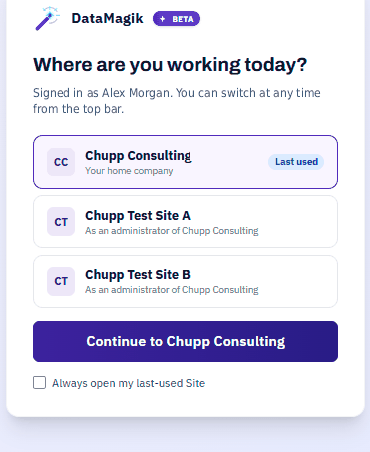
- The company you used last is marked Last used and chosen for you. Press Continue to company.
- Tick Always open my last-used Site to skip the question next time.
- To change this later, open your account's security page and use Change where you start on the Where you start card.
People with only one company never see the picker. DataMagik Extend, the mobile app, the desktop app and assistant connections do not ask.
Deactivate or reactivate a Site
A Site can be deactivated, for example when a plant closes. Only DataMagik can deactivate or reactivate a Site; contact DataMagik to do either. While a Site is deactivated:
- its users cannot sign in to it;
- its schedules, triggers, kiosks and agent triggers are paused;
- its API keys and connected apps are refused;
- file-gateway logins to it are refused.
Nothing is deleted. Its data and files are kept, and reactivating it resumes everything. A deactivated Site still counts toward your allowance, and is billed for the month it was deactivated.
Bringing an existing company into the family, or taking a Site out
DataMagik can attach an existing company to your family as a Site, or detach a Site so it becomes a separate company again. Changes take effect at 00:00 UTC on the 1st of a month, so no month's usage or bill is split. Before it happens, DataMagik reviews with you who gains and who loses access.
When a Site is detached, its stored files are copied out to it. The originals stay in the parent's storage for 30 days and are then deleted. Access from the parent ends, and the Site's API keys and connected apps must be set up again.
Troubleshooting
The Create a Site form is not there
You need DataMagik - Security in the parent, and the parent must be your home company. If you hold Security through access from another company, such as a consultant, ask an administrator whose home company is the parent.
Someone cannot sign in to a Site
Check that the Site is active, then that the person has access to it under Admin → Sites: people. See People, roles and admins.